


Owners of an ageing Android phone may not need to buy a replacement to fix sluggish performance. According to an editor at Tech Advisor, switching off one setting can make an old device noticeably faster and extend its usable life by at least another year.
The editor had used an Oppo A55, a mid-range phone that was well regarded when it launched, for four years. Over time the device began to falter: the battery drained faster, sometimes needing to be charged twice in a single day, and its built-in storage was nearly full.
What bothered the editor most was the phone's slowdown. Apps took longer than usual to open, and the camera developed a serious lag, with photos taking several minutes to appear in the gallery after being taken. Deleting apps and clearing the gallery did not solve the problem.
How to speed up an old Android phone
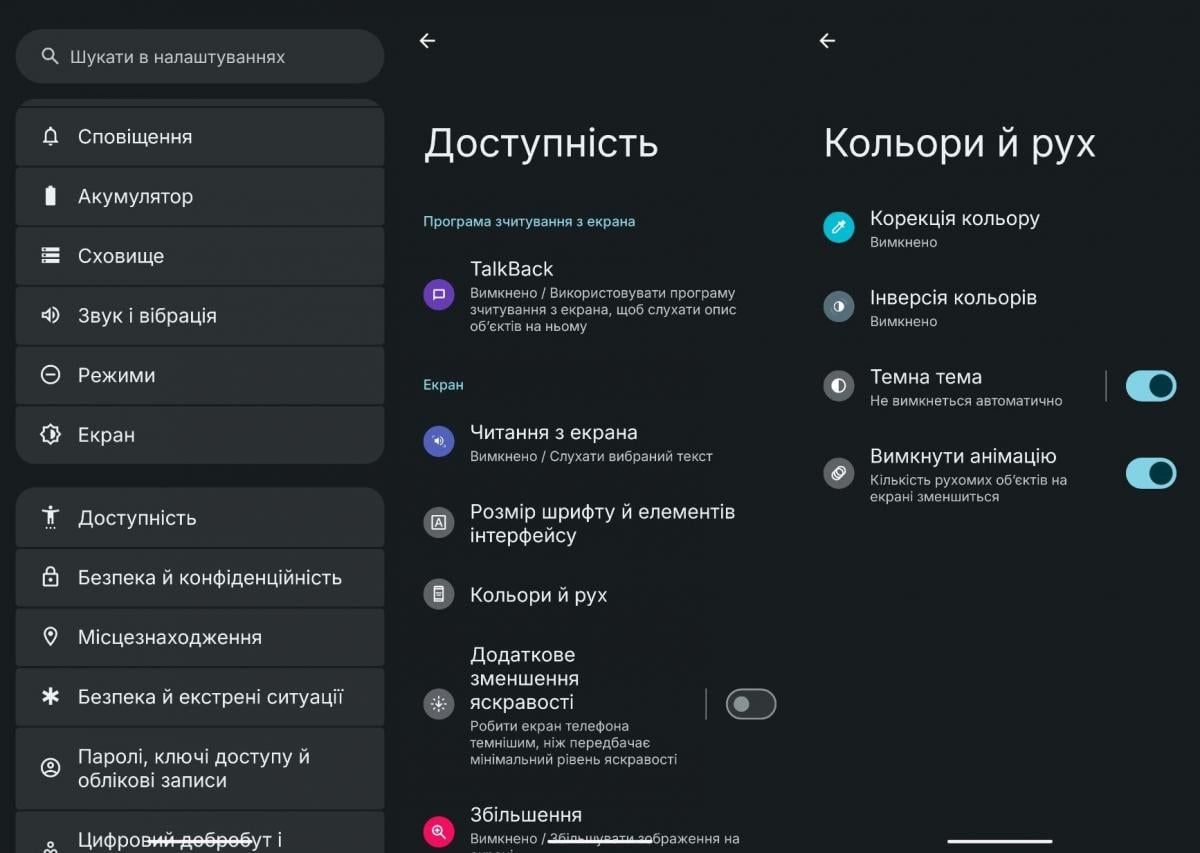
The fix turned out to be simple. Users need to find the animations section in their phone's settings and turn it off. Depending on the manufacturer, this option can be tucked away in a submenu such as Accessibility, under Colour and Motion.
From there, users should select "Remove animations" or "Disable animations." That is the entire process, with no extra apps, memory cleanup or complicated steps required.
The editor said they had not expected a single setting to change the phone's performance so much, but that the device felt almost new right away.
Why disabling animations helps
Once animations are switched off, the smooth transitions between apps disappear. Opening WhatsApp from the home screen, for example, no longer triggers a visible animation, the app now appears on screen almost instantly.
That turned out to be the main benefit. The phone no longer has to render an animation and load an app's data at the same time. The camera delay also vanished, with photos appearing in the gallery almost as soon as they are taken.
Disabling animations does not make the processor more powerful, and it does not improve performance in apps such as games. But during everyday use the difference is immediately noticeable, since the processor no longer spends resources continuously rendering animations.
The trade-off
The main downside is that the interface feels unfamiliar once animations are off. Instead of smooth transitions, apps open abruptly, so it takes some getting used to. Still, for anyone who values speed over visual polish, the difference can be considerable.
In the editor's view, most users do not actually need these animations, since they exist purely for visual effect. After turning them off, using the phone became far more comfortable.
Other options for budget buyers
For those considering a new phone instead, AnTuTu has updated its rankings of Android phones offering the best value for money, splitting models into five price categories ranging from super-budget to flagship.


